A pool anyone in the house can run
Our pool is run by a Jandy panel, and for as long as we’ve had it, I’ve been the only person in the house who could really use it.
It isn’t that the equipment is complicated. It’s that the controls are. Warming the pool takes two switches: the panel’s pool heat, and the heat pump itself — and the heat pump didn’t live with the other controls. It was on its own screen, a few taps deep in the phone app, under a heading you’d only find if you already knew it was there. Turn on one without the other and nothing happens, quietly. Then there’s the spa, the heat and chill targets, the filter pump the heater needs running, and a pool light that changes colour by being switched off and on in a particular rhythm. Nobody else was going to learn all that. So “can you turn the pool on?” was a job for me.
There’s a tablet on the wall that everyone uses for lights and locks. The goal was simple: put the pool there, in a way anyone could use.
The part Home Assistant couldn’t see
Home Assistant already has a Jandy integration, and it covers the easy half — pumps, the heater relay, the spa, the light. What it has never shown is the heat pump, and without the heat pump the pool doesn’t warm up.
The first obstacle was the panel itself: until recently it wasn’t even reporting the heat pump to Jandy’s cloud. That took a visit from the pool company, who came out and flashed the panel’s firmware. After the flash, the cloud suddenly knew all about it: present, off, chill available, currently in heat mode.
Home Assistant still didn’t. Its integration simply ignores that part of the response — it’s a known open issue — and to make it worse, it mis-read the new chill set point as a heating thermostat at 107°F. So the data was there, but the command to switch the heat pump on wasn’t in the integration, wasn’t in the library underneath it, and wasn’t in Jandy’s web portal either. It only existed in the phone app.
Watching the app
The honest way to learn what an app says to its server is to watch it say it.
I stood up an inspecting proxy in the home lab’s Docker cluster, behind the same reverse proxy as everything else so its web interface has a proper certificate. Point the phone’s Wi-Fi at it, trust its certificate, and every request the app makes shows up in plain text.
Two things stopped it working at first. iCloud Private Relay was routing around the proxy, and the phone hadn’t been told to fully trust the certificate — that’s a second switch, in a different part of Settings, from installing it. And one early request aimed at the proxy’s own address made it try to proxy to itself, in a loop, until it ran out of file handles. A one-line guard that refuses any request to itself fixed that.
After that it was just a matter of pressing each button in the app, once, and reading what went across. Three commands turned out to matter:
- Heat pump on / off.
- Set the targets — pool heat, pool chill, and spa heat.
- Set the light colour — one of fourteen colours and shows.
Two details from the capture shaped everything that followed. The app always sends all three targets together, even when you only change one — so the bridge has to read the current values first and change just the one you asked for, or it’ll quietly reset the others. And there is no heat/chill mode command at all. The heat pump heats when the water is below the heat target and chills when it’s above the chill target; the “mode” you see is just whichever of those it’s doing.
When the capture was done, the proxy was scaled back down to nothing and the capture file deleted. It contained live login tokens, and there’s no reason to keep them lying around.
The bridge
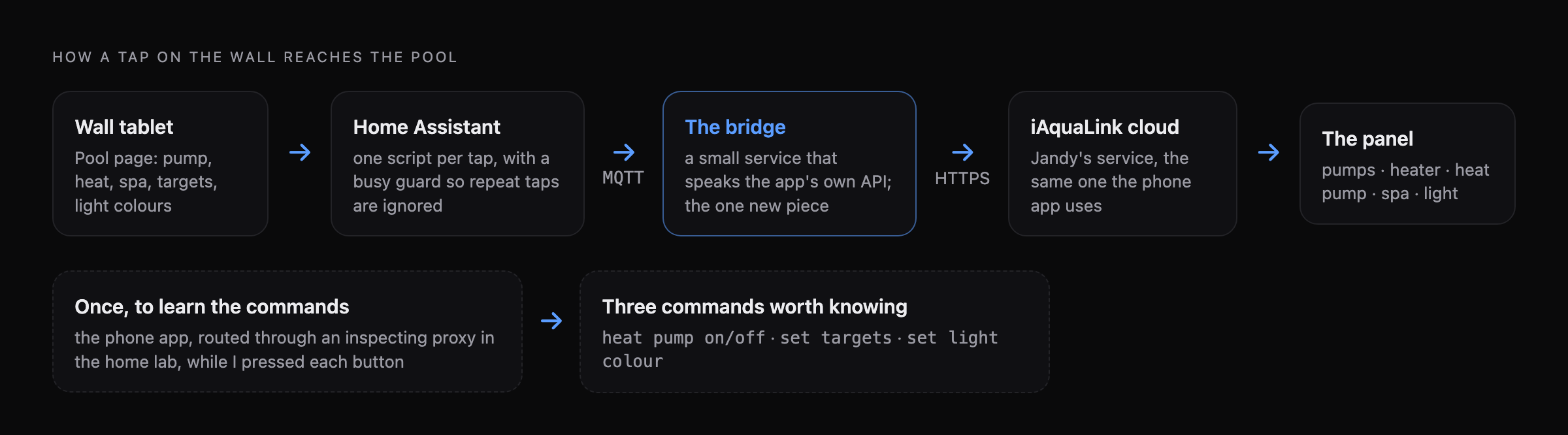
The new piece is small: a Python service on the Docker host that logs in to Jandy’s cloud the same way the app does, polls the panel, and talks to Home Assistant over MQTT. It announces itself using MQTT discovery, so nothing had to be configured by hand in Home Assistant — a “Pool Heat Pump” device just appeared, with a switch, the three target temperatures, the current mode, and a cloud-link sensor so the wall can say when the connection is down instead of showing stale numbers as if they were live.
The pool light moved across to the bridge too. Home Assistant’s own light entity had a habit of getting its state stuck, and then silently skipping a turn-off because it thought the light was already off. The bridge also handles the two awkward facts about this kind of light: a colour change takes about 45 seconds, because the light picks its colour by being cycled, and the API can’t report the current colour at all — neither can Jandy’s own app. So the bridge remembers the last colour it set and shows that, and the wall is honest about which one it thinks is showing.
Making it safe to tap
Everything on a pool takes a while. A pump takes a few seconds to spin up, the heat pump longer, the light the best part of a minute. On a wall tablet, a control that doesn’t visibly react is a control that gets tapped again, and again — and every one of those taps is a real command to real equipment.
So every pool control goes through one script with a busy flag:

The first tap sets that control busy: it turns amber, a spinner starts, and the tile says how long it might take. Any tap on it while it’s busy is ignored. The script sends the command, waits for the state to change, then holds for another ten seconds and checks again — because the switches report their new state about a second after the command, long before the equipment has actually done anything, and without the hold the spinner vanished almost instantly. If the change didn’t stick, the wall says so. A safety net clears any flag that’s been stuck for more than two minutes, and clears them all when Home Assistant restarts.
The light gets the same treatment, with the other colours locked out while one is changing.
On the wall
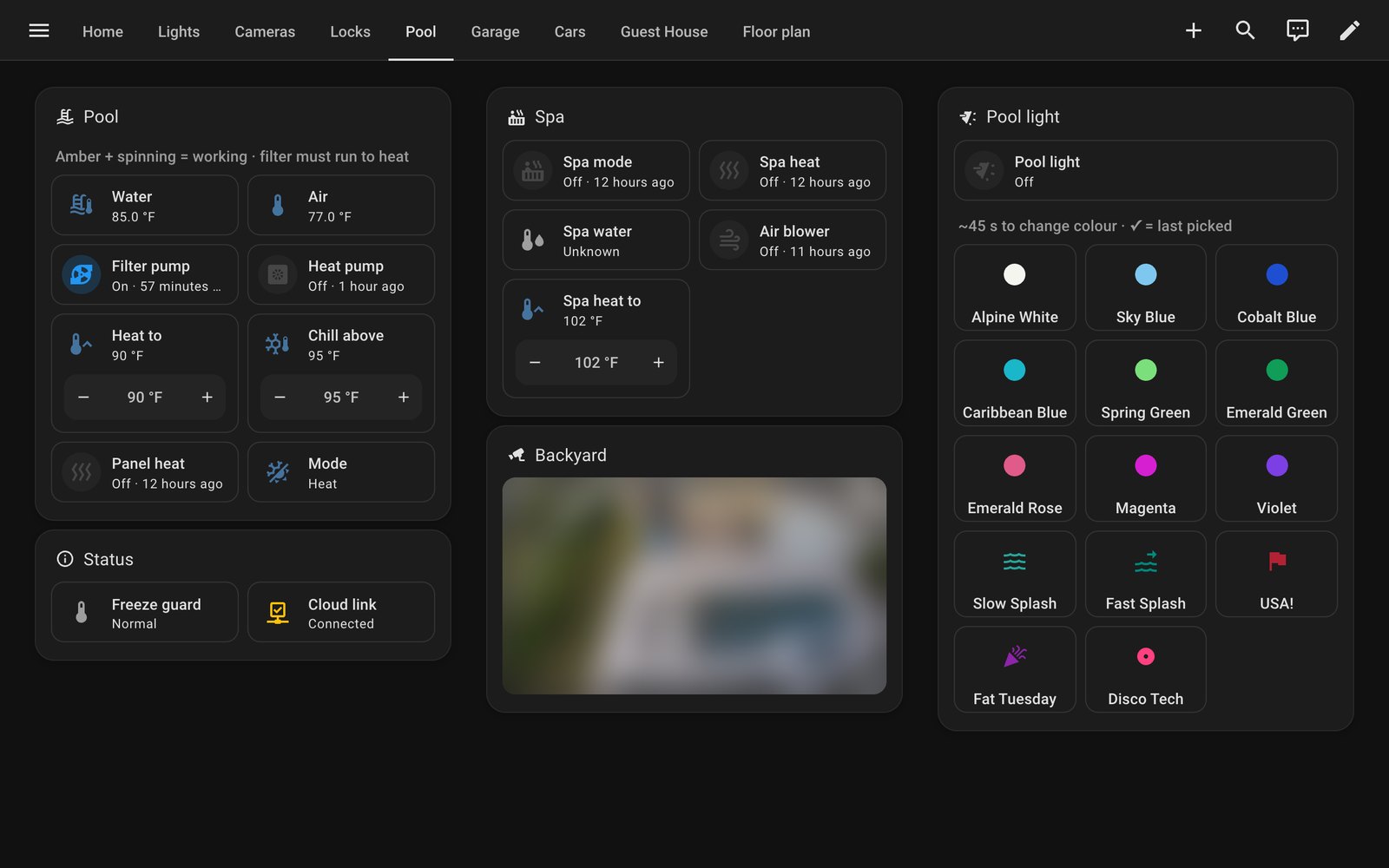
This is the whole pool now, on one page. Filter pump, heater, heat pump, spa, the heat and chill targets, fourteen colours for the light, and a camera to check it worked. The heat pump switches on and off from here on its own — no second toggle hiding in an app.
The technical part was fun, but it isn’t really the point. The point is that the pool used to need me, and now it doesn’t. Anyone who walks past the tablet can warm it up for the evening, get the spa going, or turn the light purple because it’s someone’s birthday. For the first time, the pool is something the whole family can actually use.